

Open source by Pineflight
Secret Desk
A local-first portal for every GitHub Actions secret and variable across your repositories: it shows what expires when, issues new tokens at the providers, lets a human review and confirm each new value, and only then writes it straight into GitHub. Secret values are never stored.
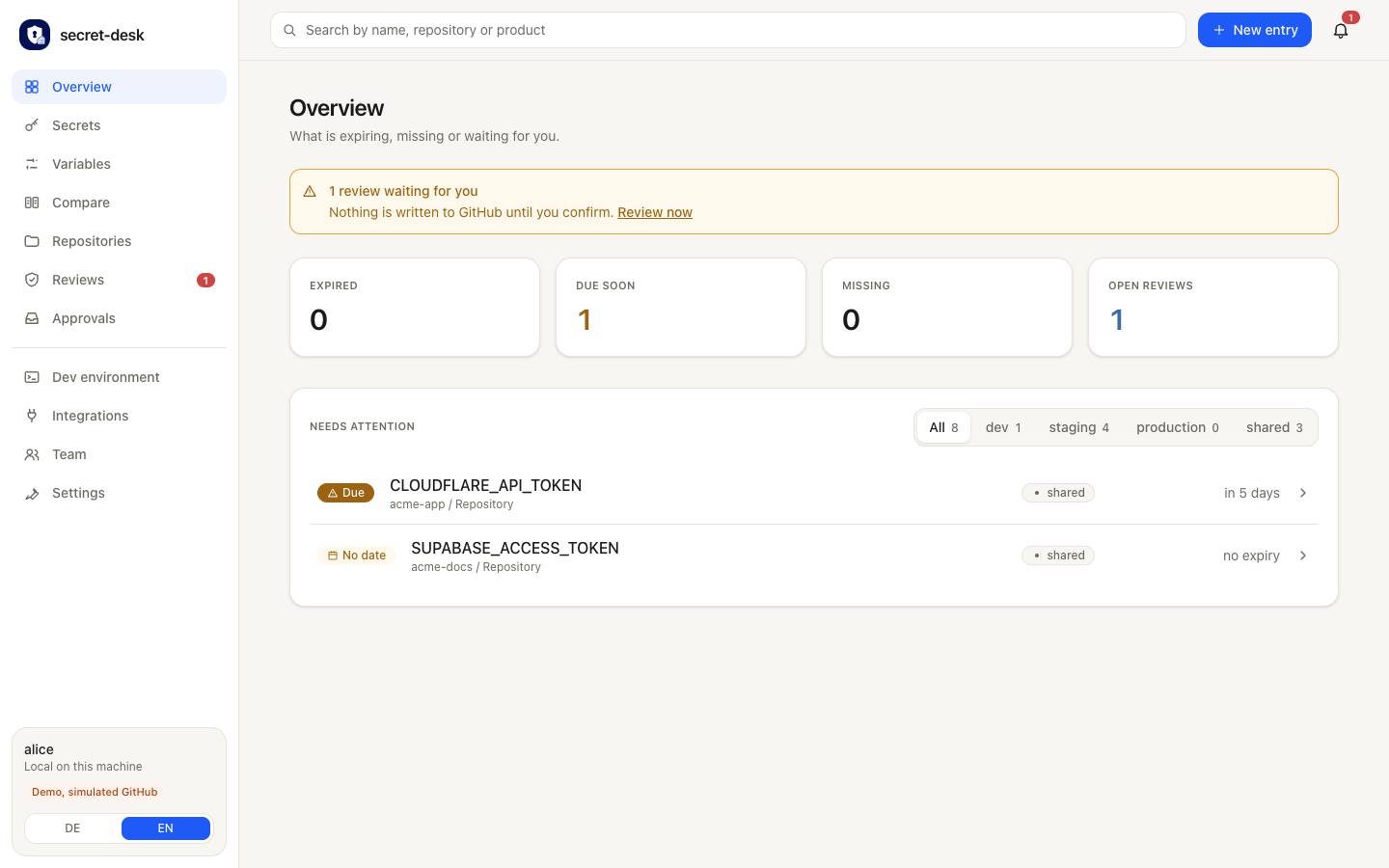
At a glance
- 01
One place for all secrets and variables
Every GitHub Actions secret and variable of every repository in one overview, with stage, status, expiry date and owner.
- 02
Issue and rotate at the provider
For Stripe, Cloudflare, Supabase, Grafana and more, the portal creates new tokens at the provider, checks them automatically and writes them to GitHub once you confirm. Values are never stored.
- 03
Identity checks in the portal
When a provider asks for a confirmation code or password during a run, you answer in the portal instead of switching to the browser window.
- 04
Compare stages
One matrix across all repositories shows what is missing, extra or different in dev, staging and production.
- 05
Integration API with OpenAPI
An OpenAPI 3.1 description for tools such as Jira, Confluence and Azure DevOps, connected through a job inside your network. They read metadata and request renewals but never see a value.
- 06New
Ready-made dev environment
A .env.local per repository from a template, with local URLs, test keys and freshly generated local secrets.
Local development
A ready .env.local for every repository
New machine, new team member, new repository: instead of collecting values from chats and old files, Secret Desk generates the development file from a team template. One click in the portal or one command, and the local environment starts.
- Local URLs
- The template fills in localhost addresses, for example for the website and the local Supabase stack.
- Test keys, not live keys
- Personal development tokens, such as a key from the Stripe sandbox, are asked for when the file is generated.
- Local secrets, freshly generated
- Random values are created on export and stored nowhere.
- Staging and live stay where they are
- Secret values exist only for development stages. Staging or production secrets never reach a laptop.
- Stored safely
- The file is written with mode 600. The portal shows names only and warns if Git does not ignore the file.
NEXT_PUBLIC_SITE_URL=http://localhost:3000# defaultNEXT_PUBLIC_SUPABASE_URL=http://127.0.0.1:54321# defaultSTRIPE_SECRET_KEY=rk_test_••••••••# test keyRATE_LIMIT_SECRET=3f9a••••••••c41e# generated locally
How it works
- 01
Every project collects tokens, API keys and webhook secrets, and each one runs out at some point. Secret Desk lists them with owner, stage and expiry, so nothing lapses unnoticed on a Friday evening.
- 02
When one needs renewing, the portal creates the new value at the provider: through its API, or, where there is none, by walking a visible Chrome through the form while you sign in yourself. It then checks the new value: does it work, are the permissions right, when does it expire, are the targets reachable. A review report with an evidence image goes to a human, who confirms or rejects it.
- 03
Only after that confirmation is the value written, encrypted, into GitHub secrets and variables, and the old one revoked. Rejecting deletes the new value at the provider again. A value lives in memory for at most 15 minutes and is never stored.
- 04
Around this core: stages you define yourself, a comparison matrix of secrets and variables across stages and repositories, a dev .env export with mode 600, a team file without values, and an optional encrypted vault for integration tokens whose key sits in the OS keychain. Instead of pasting a token you can point to an environment variable or a 1Password reference.
What Secret Desk does
See what expires when
Every secret and variable is listed by stage and status, with owner, description and links. A token no longer runs out unnoticed on a Friday evening.
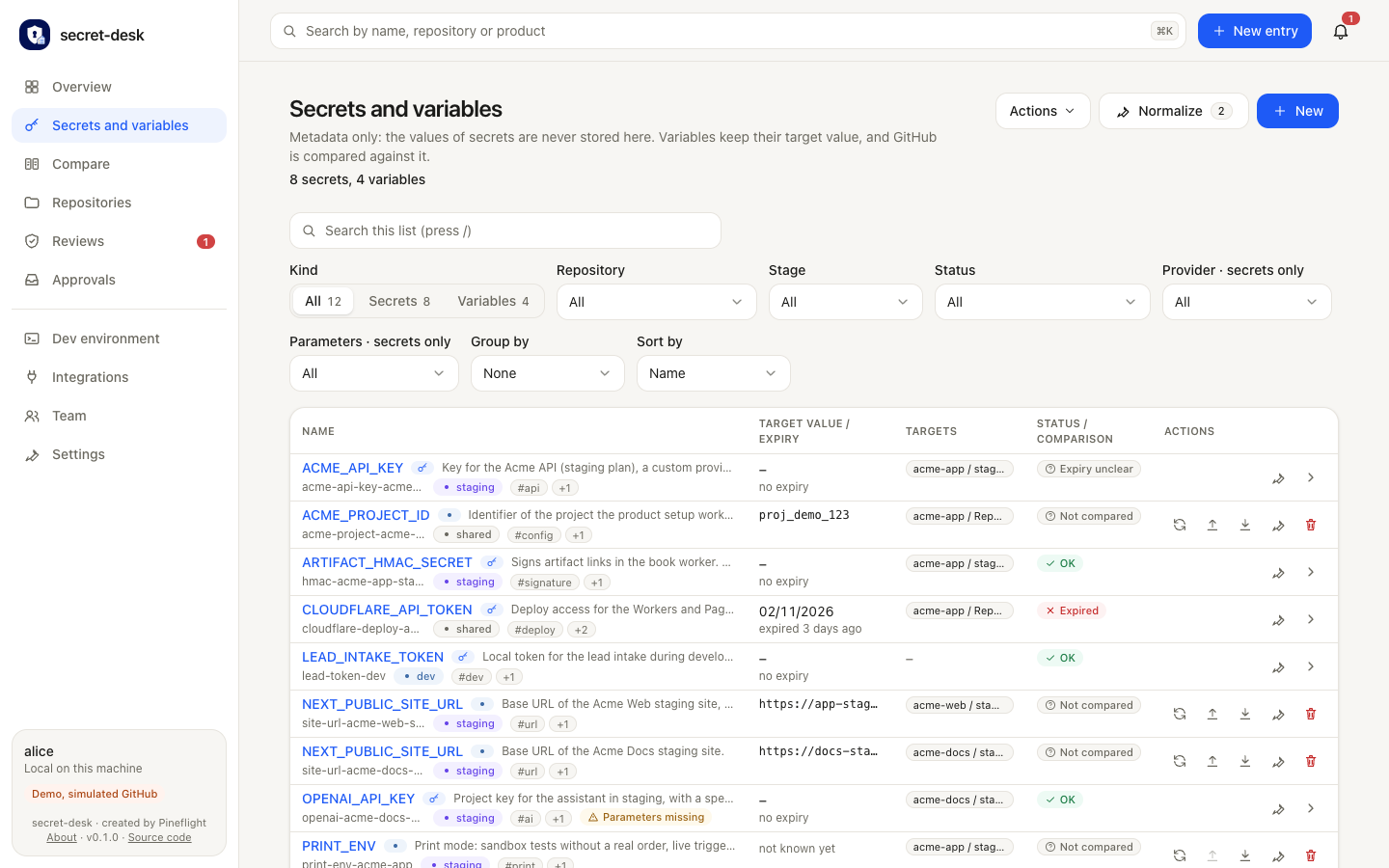
The full list of entries, in the demo 8 secrets and 4 variables. At the top, filters for kind, repository, stage, status, provider and missing parameters, plus grouping and sorting. Each table row shows the name with description and tags, the target value or expiry, the targets in GitHub and the status: “OK”, “Expired” (the Cloudflare token, for three days), “Expiry unclear” or “Not compared”. Each row has action icons on the right. A click leads to the detail view.
New tokens through APIs
Where a provider has an API, the portal issues the new value itself. No more copying and pasting by hand.
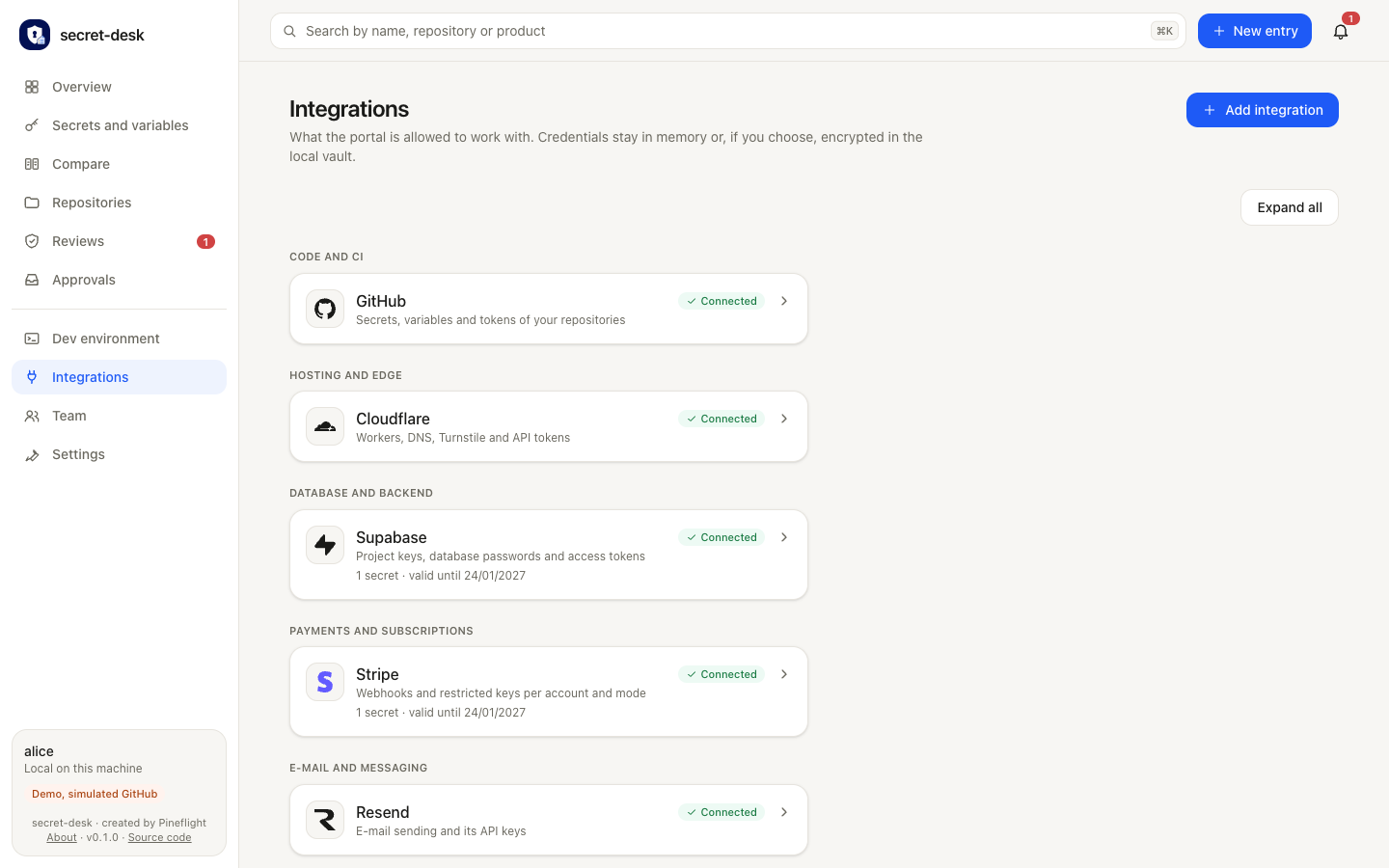
The “Integrations” page shows what the portal is allowed to work with. A note below the heading says credentials stay in memory or, if you choose, encrypted in the local vault. Providers are grouped by category: code and CI (GitHub), hosting and edge (Cloudflare), database (Supabase), payments (Stripe), e-mail (Resend). Each card shows the “Connected” status, a short description and, where one exists, how long the stored secret stays valid. “Add integration” sits at the top right, next to “Expand all”.
Review, confirm, then write
The new value is verified and summarized in a review report. A human confirms each item. Only then is it written to GitHub.
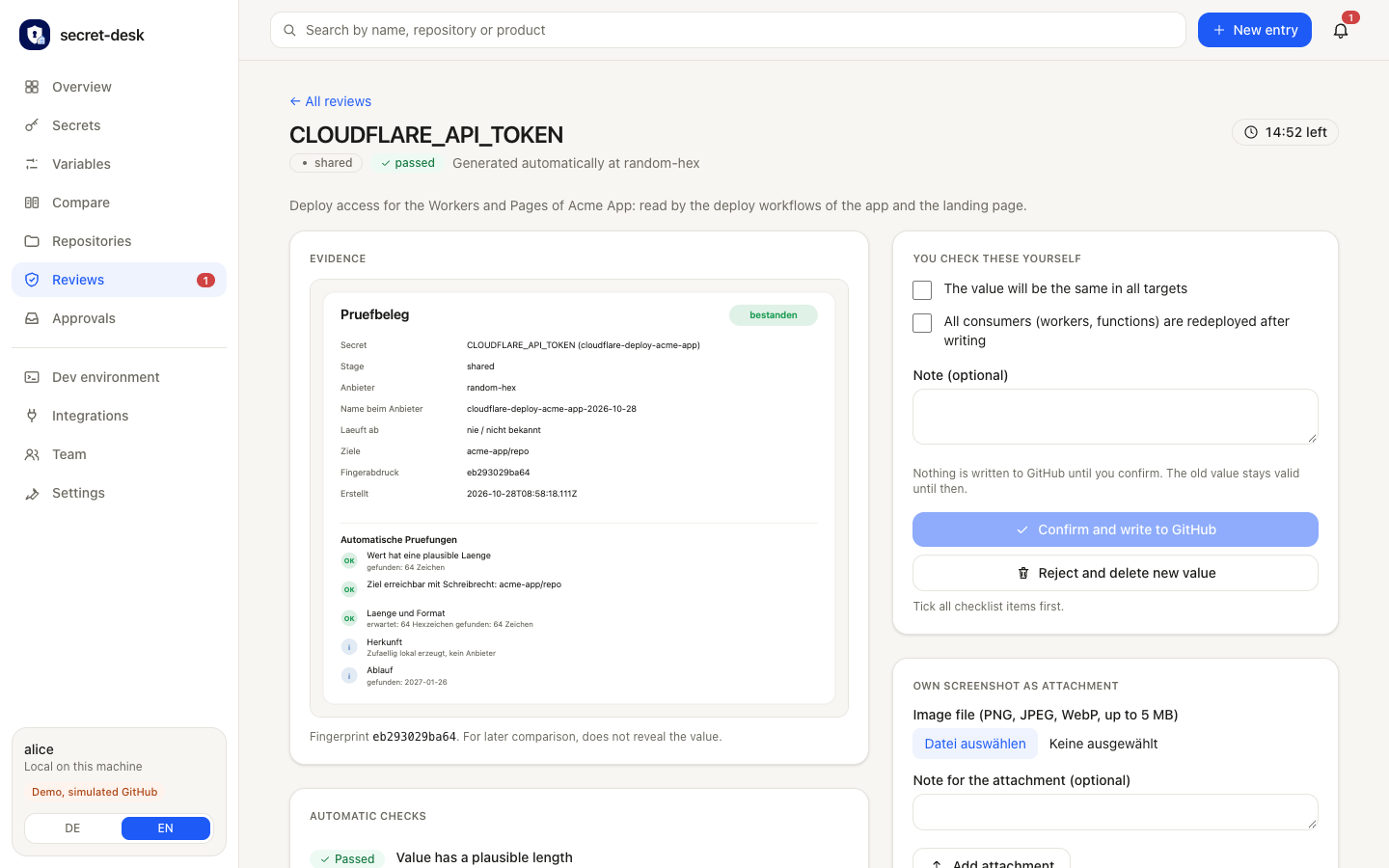
The review screen for a newly generated value. On the left the evidence sheet: secret, stage, provider, target repository and a fingerprint that allows a later comparison without revealing the value. Below it the automatic checks, each marked “OK”, such as a plausible length and “target reachable with write access”. On the right a checklist a person ticks off themselves (same value in all targets, all consumers redeployed after writing), a note field and two buttons: “Confirm and write to GitHub” only becomes active once everything is ticked, “Reject and delete new value” cleans up at the provider. A countdown at the top right shows how long the value stays in memory (14:52 here).
Values are never stored
A value stays in memory for at most 15 minutes and is passed on in exactly two places: the provider API and, encrypted, GitHub.
More views
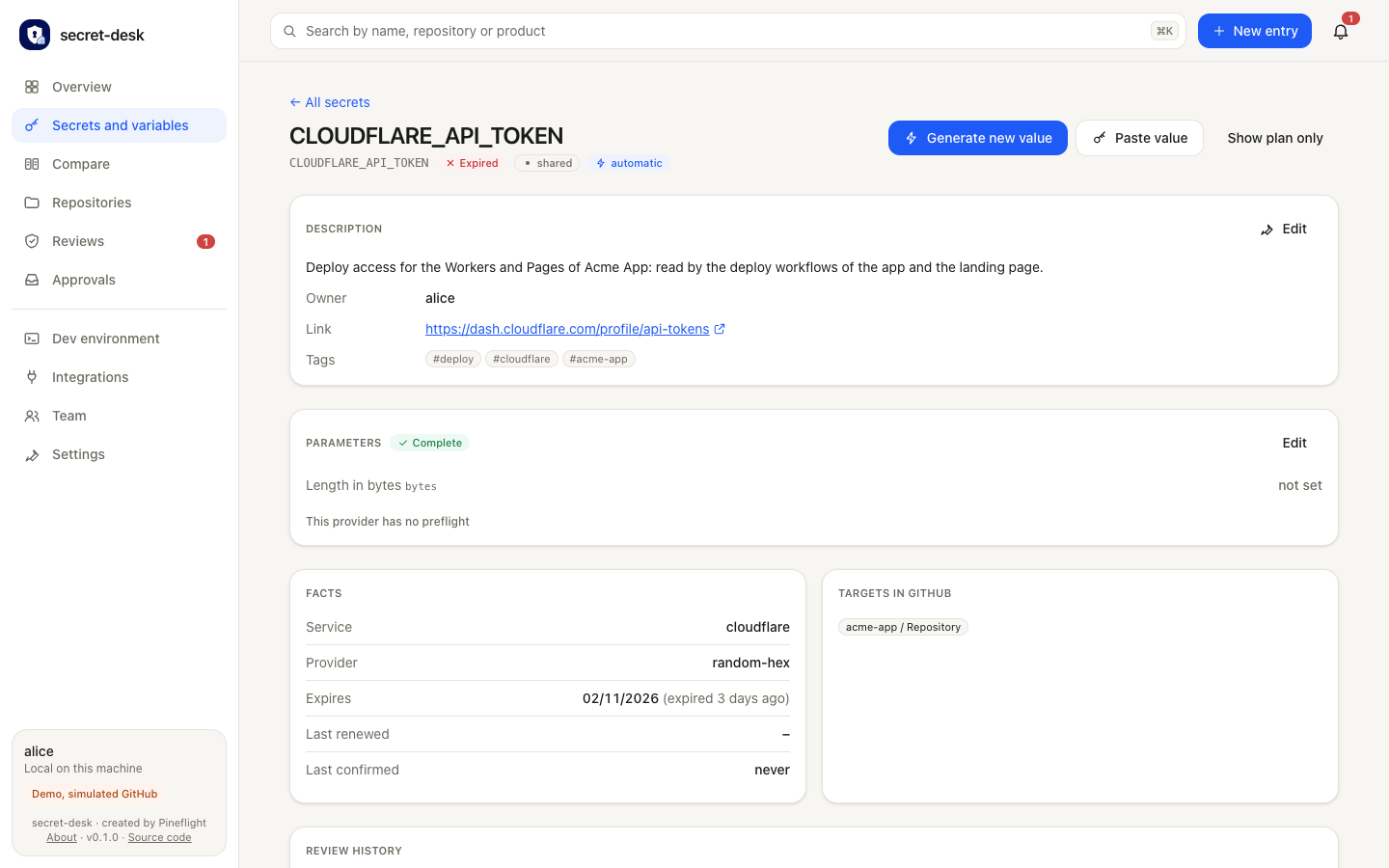
Detail view of one secret with history and targets
The page for a single secret, here the expired Cloudflare token. At the top the status and three ways forward: “Generate new value” (automatically through the provider’s API), “Paste value” and “Show plan only”. Below, cards with the description, owner and a link to the provider’s dashboard, the parameters, the facts (service, provider, expiry date, last renewed, last confirmed) and the targets in GitHub. At the very bottom the history of all reviews.
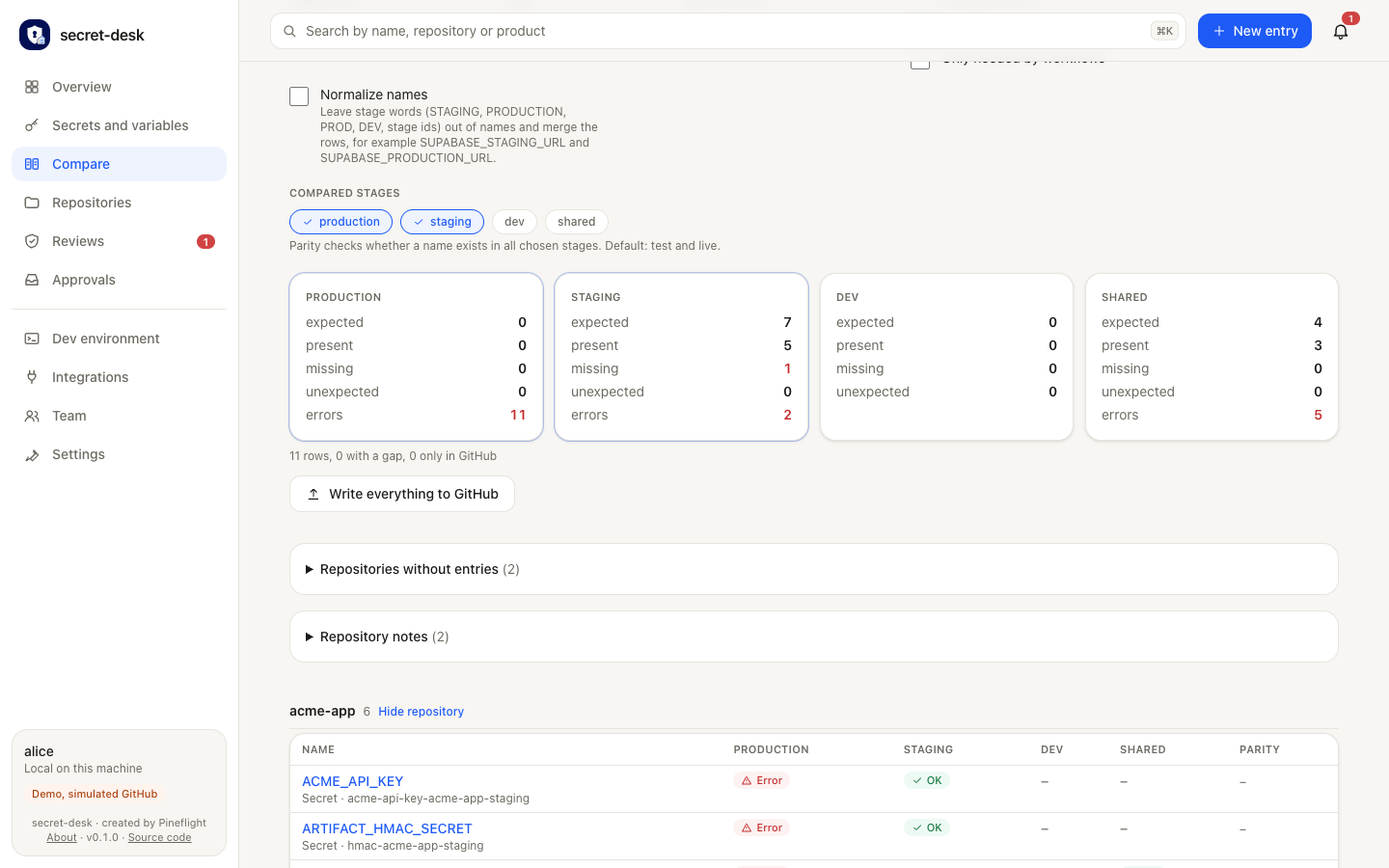
Compare: live matrix of names against stages
The comparison matrix. At the top you pick the stages to compare (production and staging here) and can strip stage words such as STAGING or PRODUCTION from names so that related rows merge. Below, one card per stage with the counters expected, present, missing, unexpected and errors (staging: 7 expected, 5 present, 1 missing). The “Write everything to GitHub” button closes gaps. Further down, a table per repository: rows are names, columns are stages, each cell shows “OK” or “Error”.
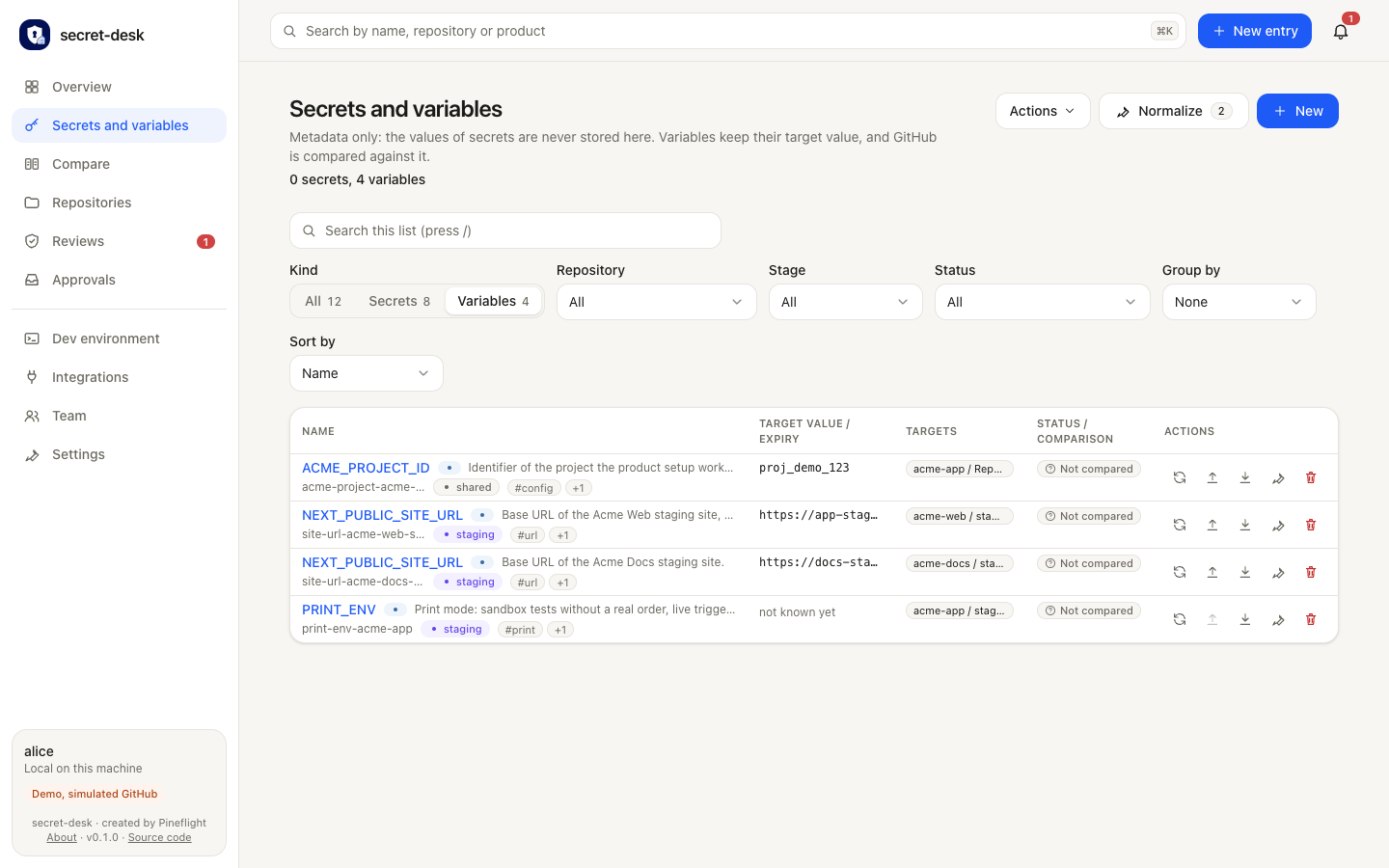
Variables: expected value against GitHub
The same list, filtered to variables. Unlike secrets, variables have a target value that the portal keeps and compares with GitHub. The demo shows four entries, for example a project ID with the value proj_demo_123 and two staging site addresses. The “Status” column shows whether a value has been compared with GitHub yet; each row has action icons for comparing, uploading, downloading and deleting.
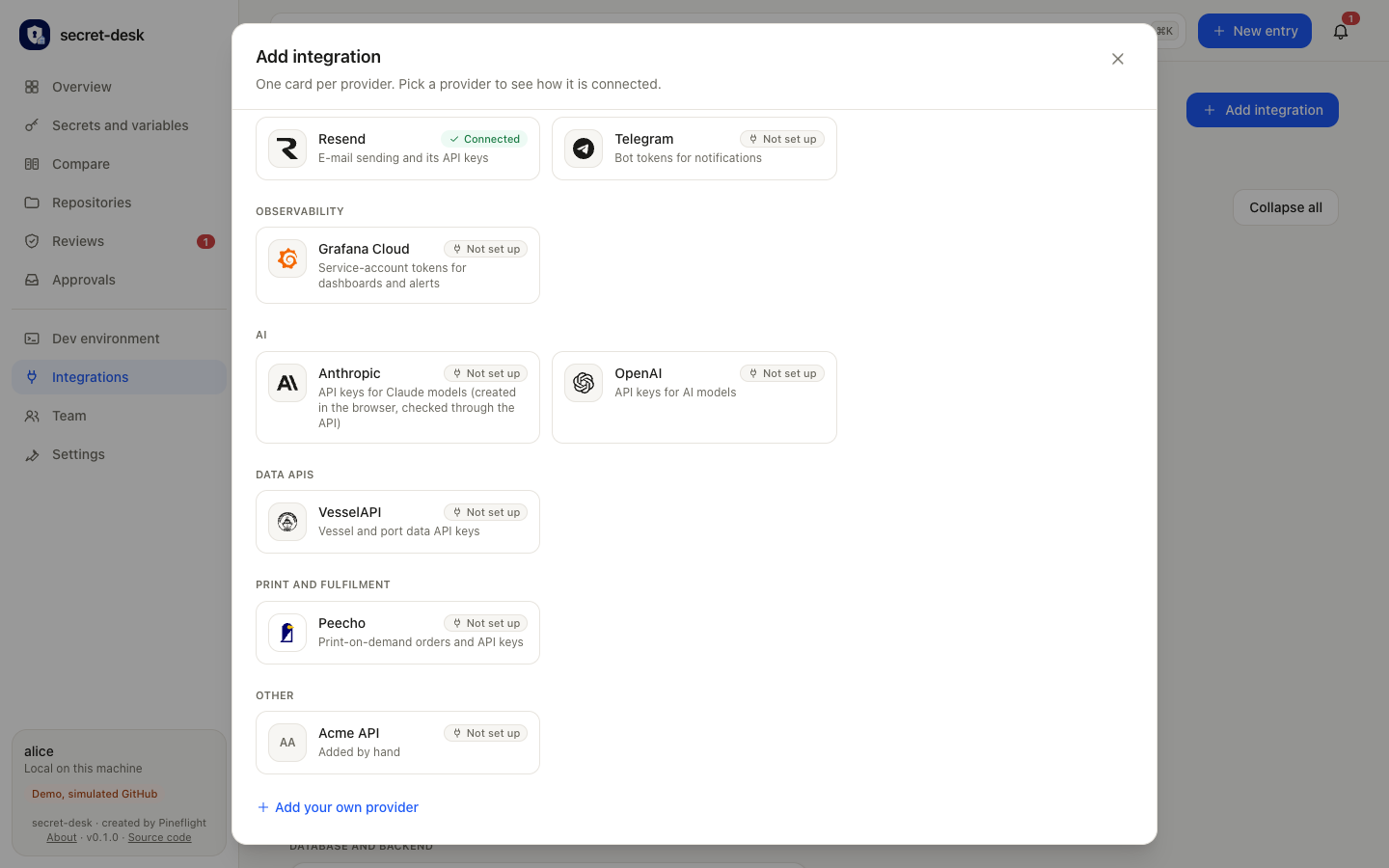
Provider picker with logos, grouped by category
The “Add integration” dialog, scrolled further down. Each provider has its own card with logo, short description and status (“Connected” or “Not set up”). The categories shown are observability (Grafana Cloud), AI (Anthropic, OpenAI), data APIs (VesselAPI), print and fulfilment (Peecho) and other (an example provider added by hand). At the very bottom “Add your own provider” opens a form for services that are still missing.
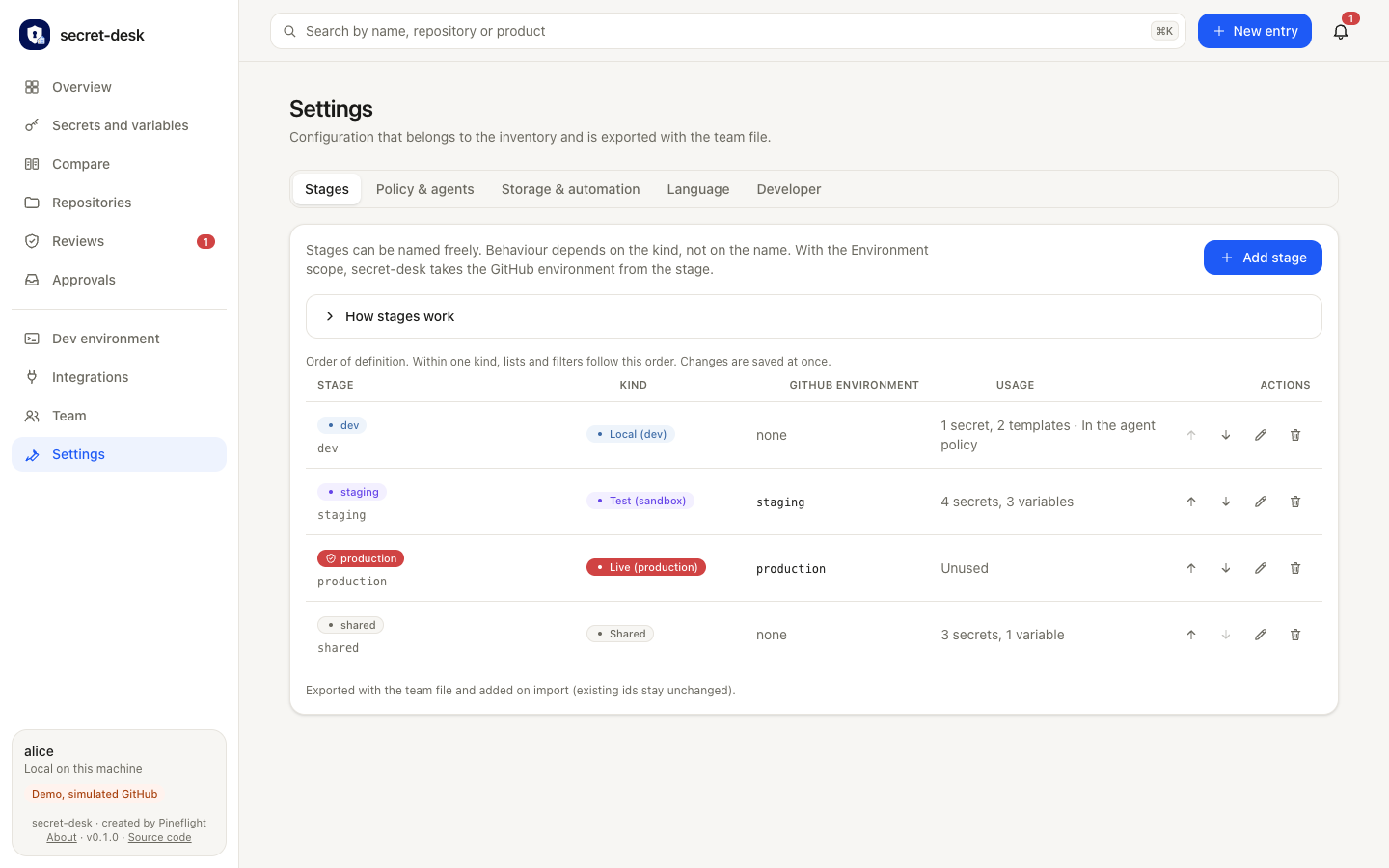
Settings: freely configurable stages
Settings, here the “Stages” tab (next to it “Policy & agents”, “Storage & automation”, “Language” and “Developer”). Stages can be named freely; how they behave depends on their kind: local (dev), test (sandbox), live (production) or shared. The table shows for each stage the GitHub environment it maps to, how many secrets and variables sit on it, and arrows for reordering, a pencil and a bin. You create new stages with “Add stage”.
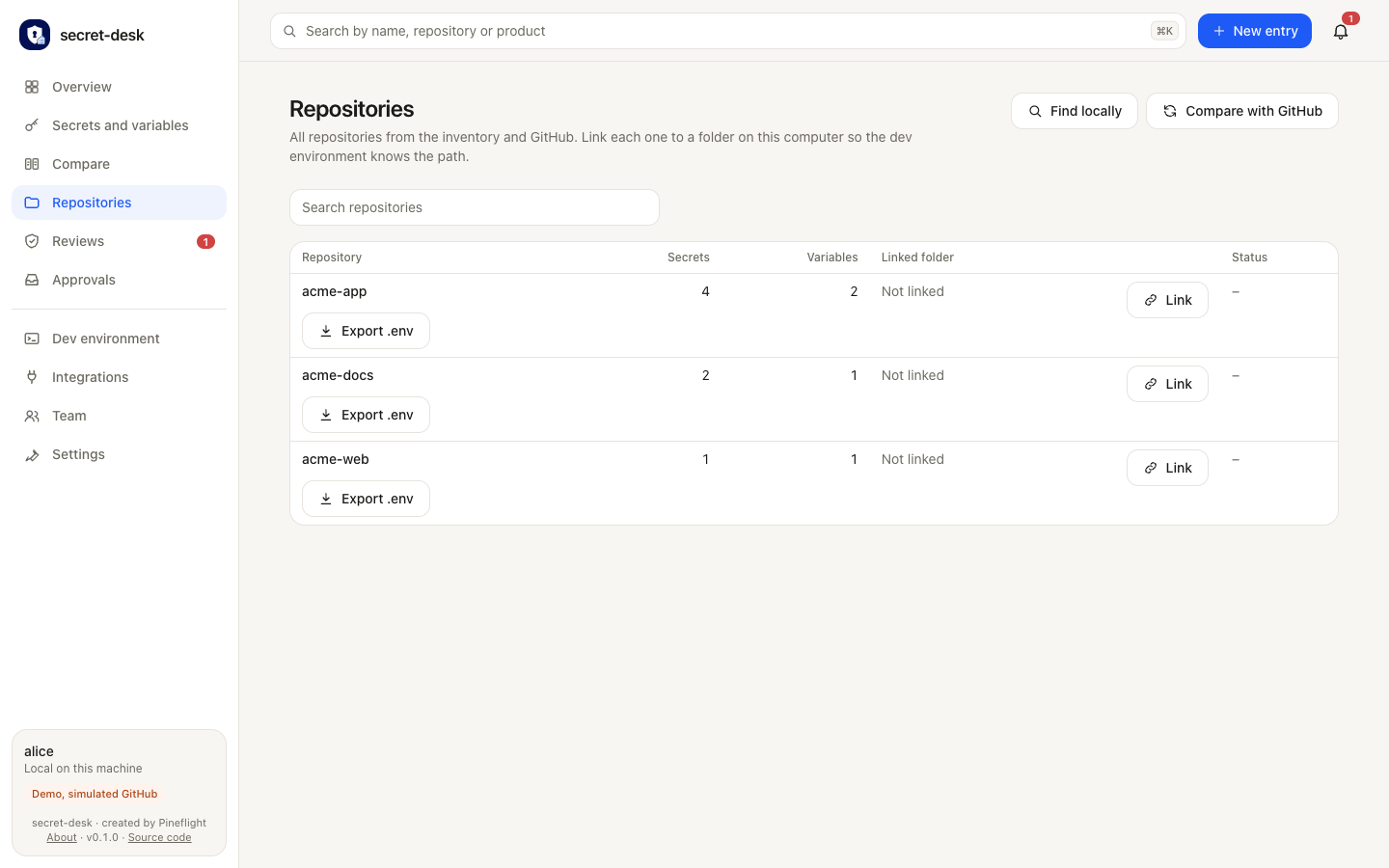
Repositories: link folders on this machine
All repositories from the inventory and from GitHub in one table, with the number of secrets and variables per repository. The “Linked folder” column shows which folder on this computer belongs to it (none yet in the demo, hence “Not linked”); “Link” sets the mapping, and “Export .env” creates the development file for that repository. At the top, “Find locally” finds folders automatically and “Compare with GitHub” reads the repositories again.
Connected integrations
What Secret Desk talks to today. Some endpoints are verified against the live services, others so far only against mocks: the documentation lists the status per provider.
Via API
The portal creates, checks and revokes these values itself, using a token you connect once.
Writes secrets, variables and environment secrets, encrypted. Reads which names exist.
API tokens, Access service tokens and R2 credentials.
Site keys and secrets for bot protection.
API keys, the service role key and the database password.
Webhook secrets, per account and in test or live mode.
API keys for sending email.
Service account tokens and access policy tokens.
Service account keys per project, through an organization admin key.
Reads project and app IDs for variable sources.
Generated locally
Random hex, base64 and UUID values, and VAPID key pairs for web push.
Via browser
For providers without a key API, a visible Chrome walks through the form from a YAML recipe. Sign-in, 2FA and CAPTCHA stay with you.
Fine-grained personal access tokens.
Access tokens.
Restricted keys for one account and mode.
API keys and the organization admin key.
API keys per workspace and the optional admin key.
Access policies with a token.
API keys.
Secret API keys with one access level per section.
Reads the merchant key and secret, creates nothing.
For AI agents
An MCP server with 24 tools, a skill and an HTTP agent API with an OpenAPI description. Agents maintain metadata, query status and request renewals. They never see a value and never confirm.
Full list and status
Key facts
- License
- MIT, free to use and modify
- Runs
- Locally on your machine, nothing runs in someone else's cloud
- Platforms
- macOS, Linux and Windows
- Interface
- German and English
- Local environment
- The portal generates the .env.local per repository from a template: local URLs, test keys and locally generated secrets, mode 600. Staging or production secrets are never exported.
- Team
- The configuration lives in a team file without values. Share it so everyone on the team uses the same setup.
- AI agents
- An MCP server, a skill and an HTTP API connect AI agents faster. They never see a value.
Honest status
Secret Desk is an early version (0.1.0). Several provider endpoints have so far only been tested against mocks, and real-world testing has happened on macOS. The project page on GitHub lists the limits in detail.
Try it yourself
The source code, the documentation and a demo that needs no accounts are on GitHub.
Secret Desk on GitHub